
Nissan Sentra Owners Manual: How to use the touch-screen
CAUTION
The glass display screen may break if it is hit with a hard or sharp object. If the glass screen breaks, do not touch it.
Doing so could result in an injury.
To clean the display, never use a rough cloth, alcohol, benzine, thinner or any kind of solvent or paper towel with a chemical cleaning agent. They will scratch or deteriorate the panel.
Do not splash any liquid such as water or car fragrance on the display. Contact with liquid will cause the system to malfunction.
To help ensure safe driving, some functions cannot be operated while driving.
The on-screen functions that are not available while driving will be “grayed out� or muted.
Park the vehicle in a safe location and then operate the navigation system.
WARNING
|
Touch-screen operation
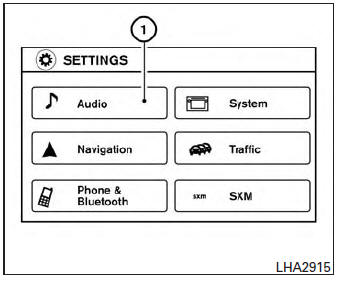
| Menu Item | Result | |
| Selecting the item | Touch an item to select . To select the “Audio� key, touch the “Audio� key 1 on the screen. Touch the “BACK� key to return to the previous screen. | |
| Adjusting the item | Touch the “+� key or the “ � key to adjust the settings of an item. Touch the up arrow to scroll up the page. Touch the down arrow to scroll down the page. | |
| Inputting characters | Touch the letter or number key. There are some options available when inputting characters. | |
| 123/ABC | Changes the available character set to numbers. | |
| Space | Inserts a space. | |
| Delete | Deletes the last inputted character with one touch. Touch and hold the “Delete� key to delete all of the characters. | |
| OK | Completes the character input. | |
Touch-screen maintenance
If you clean the display screen, use a dry, soft cloth. If additional cleaning is necessary, use a small amount of neutral detergent with a soft cloth. Never spray the screen with water or detergent.
Dampen the cloth first and then wipe the screen.
How to use the BACK button
Press the BACK button to return to the previous screen.
 Control panel buttons — color screen with Navigation System (if so equipped)
WARNING
Positioning of the heating or air conditioning
controls and display controls
should not be done while driving in order
that full attention may be given to
the drivin ...
 How to use the APPS – i button
For more information about the “SiriusXM Travel
Link�, and “SiriusXM Traffic� features, see the
separate Navigation System Owner’s Manual.
For more information about the “My App ...
Other materials:
Audio operation precautions
Compact disc (CD) player
CAUTION
Do not force a compact disc into the CD
insert slot. This could damage the CD
and/or CD player.
Trying to load a CD with the CD door
closed could damage the CD and/or CD
player.
Only one CD can be loaded into the CD
player at a time.
Only ...
P0078 EVT Control solenoid valve
DTC Logic
DTC DETECTION LOGIC
DTC No.
CONSULT screen terms
(Trouble diagnosis content)
DTC detecting condition
Possible cause
P0078
EX V/T ACT/CIRC-B1
(Exhaust valve control solenoid circuit
bank 1)
An improper voltage is sent to the ECM
through exhaust v ...
Does not stop fully-open or fullyclosed
position
Diagnosis procedure
1. Perform initialization procedure
Perform initialization procedure.
Refer to RF-18, "ADDITIONAL SERVICE WHEN REPLACING CONTROL UNIT : Special Repair
Requirement".
Is the inspection result normal?
YES >> Inspection End.
NO >> Perform basic ins ...
