
Nissan Sentra Owners Manual: Heater and air conditioner (automatic) (if so equipped)
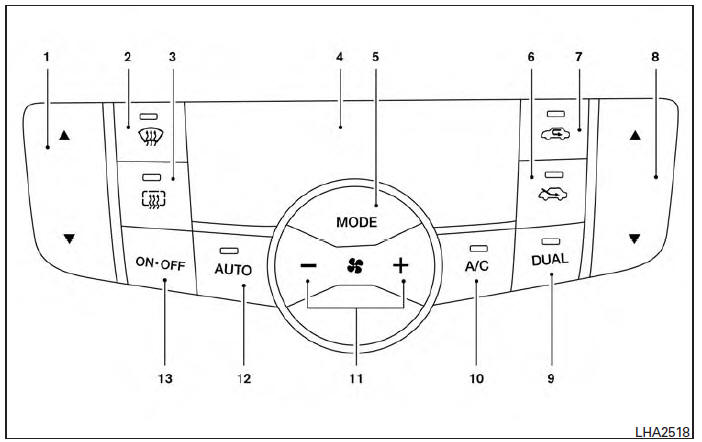
- Temperature control buttons (driver’s side)
 (front defroster) button
 (rear window defroster)
button- Display screen
- MODE (manual air flow control) button
 Fresh air intake button
 Air recirculation button
- Temperature control buttons (passenger’s side)
- DUAL button
- A/C (air conditioner) button
 (fan speed control) buttons
- AUTO (automatic) button
- ON-OFF button
WARNING
- The air conditioner cooling function operates only when the engine is running.
- Do not leave children or adults who would normally require the assistance of others alone in your vehicle. Pets should also not be left alone. They could accidentally injure themselves or others through inadvertent operation of the vehicle. Also, on hot, sunny days, temperatures in a closed vehicle could quickly become high enough to cause severe or possibly fatal injuries to people or animals.
- Do not use the recirculation mode for long periods as it may cause the interior air to become stale and the windows to fog up.
Start the engine and operate the controls to activate the air conditioner.
NOTE:
- Odors from inside and outside the vehicle can build up in the air conditioner unit. Odor can enter the passenger compartment through the vents.
- When parking, set the heater and air conditioner
controls to turn off air recirculation to
allow fresh air into the passenger compartment.
This should help reduce odors inside the vehicle.
 Air flow charts
The following charts show the button and dial
positions for MAXIMUM AND QUICK heating,
cooling or defrosting. The air recirculation
button should always be in the OFF position
for heating and defr ...
 Automatic operation
Heating (A/C OFF)
The air conditioner does not activate. When you
need to heat only, use this mode.
Press the A/C button. (A/C OFF will be
displayed and A/C indicator will turn off.)
Use the ...
Other materials:
Wiring diagram
Sport mode system
Wiring diagram
...
Unit removal and installation
Front suspension member
Exploded View
Upper link
Front suspension member
Member stay
Front
Upper link
Front suspension member
Member stay
Front
Removal and Installation
REMOVAL
Remove the front wheel and tire using power tool. Refer to WT-47,
"Explode ...
Rear drum brake
BRAKE LINING
BRAKE LINING : Inspection
INSPECTION
Brake Lining
Check brake lining wear thickness (A). Check using a scale if
necessary.
Lining wear thickness (A) : Refer to BR-55, "Rear
Drum Brake".
BRAKE DRUM
BRAKE DRUM : Inspection
INSPECTION
Appearance
Check surfac ...
