
Nissan Sentra Service Manual: Diagnosis system (BCM)
Common item
Common item : consult function (bcm - common item)
Application item
Consult performs the following functions via can communication with bcm.
| Direct diagnostic mode | Description |
| ECU identification | The bcm part number is displayed. |
| Self Diagnostic Result | The BCM self diagnostic results are displayed. |
| Data monitor | The bcm input/output data is displayed in real time. |
| Active test | The BCM activates outputs to test components. |
| Work support | The settings for bcm functions can be changed. |
| Configuration |
|
| CAN DIAG SUPPORT MNTR | The result of transmit/receive diagnosis of can communication is displayed. |
System application
Bcm can perform the following functions.
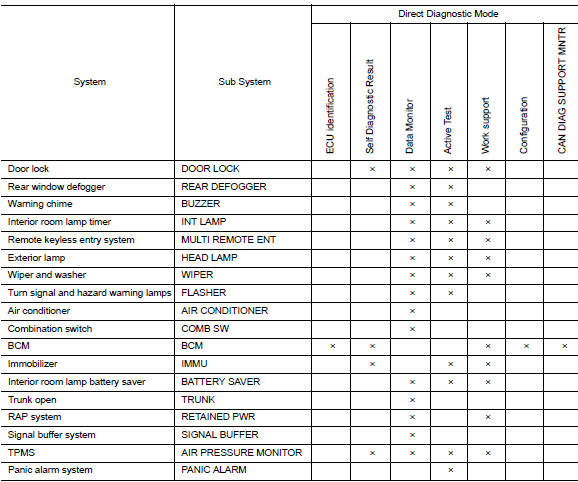
Immu
Immu : consult function (bcm - immu)
Self diagnostic result
Refer to bcs-109, "dtc index".
Active test

Work support

Diagnosis system (IPDM E/R)
Diagnosis description
Auto active test
Description
- In auto active test, the ipdm e/r sends a drive signal to the following systems to check their operation.
- Front wiper (LO, HI)
- Parking lamp
- License plate lamp
- Tail lamp
- Front fog lamp (if equipped)
- Headlamp (LO, HI)
- A/C compressor (magnet clutch) (if equipped)
- Cooling fan
Operation Procedure
NOTE:
Never perform auto active test in the following conditions.
- Passenger door is open
- CONSULT is connected
- Close the hood and lift the wiper arms from the windshield. (Prevent windshield damage due to wiper operation)
NOTE:
When auto active test is performed with hood opened, sprinkle water on windshield beforehand.
- Turn the ignition switch OFF.
- Turn the ignition switch ON, and within 20 seconds, press the driver door switch 10 times. Then turn the ignition switch OFF.
- Turn the ignition switch ON within 10 seconds. After that the horn sounds once and the auto active test starts.
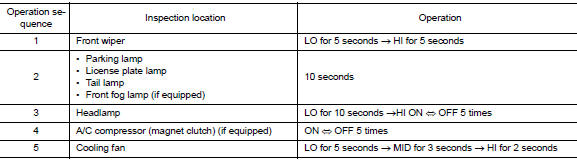
- After a series of the following operations is repeated 3 times, auto active test is completed.
NOTE:
- When auto active test has to be cancelled halfway through test, turn the ignition switch OFF.
- When auto active test is not activated, door switch may be the cause. Check door switch. Refer to DLK-255, "Component Inspection".
Inspection in Auto Active Test
When auto active test is actuated, the following operation sequence is repeated 3 times.
Concept of Auto Active Test
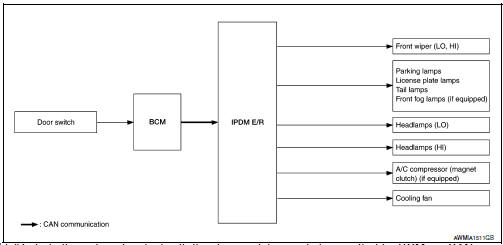
- IPDM E/R starts the auto active test with the door switch signals
transmitted by BCM via CAN communication.
Therefore, the CAN communication line between IPDM E/R and BCM is considered normal if the auto active test starts successfully.
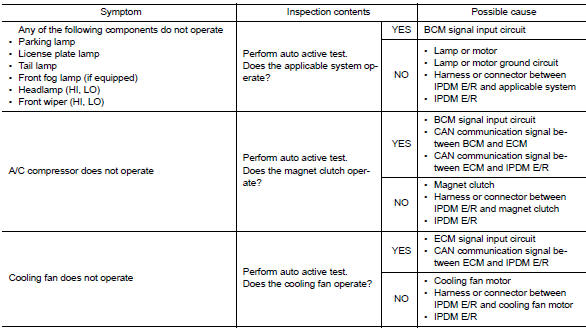
- The auto active test facilitates troubleshooting if any systems controlled by IPDM E/R cannot be operated.
Diagnosis Chart in Auto Active Test
Consult function (ipdm e/r)
APPLICATION ITEM
CONSULT performs the following functions via CAN communication with IPDM E/R.
| Direct Diagnostic Mode | Description |
| Ecu Identification | The IPDM E/R part number is displayed. |
| Self Diagnostic Result | The IPDM E/R self diagnostic results are displayed. |
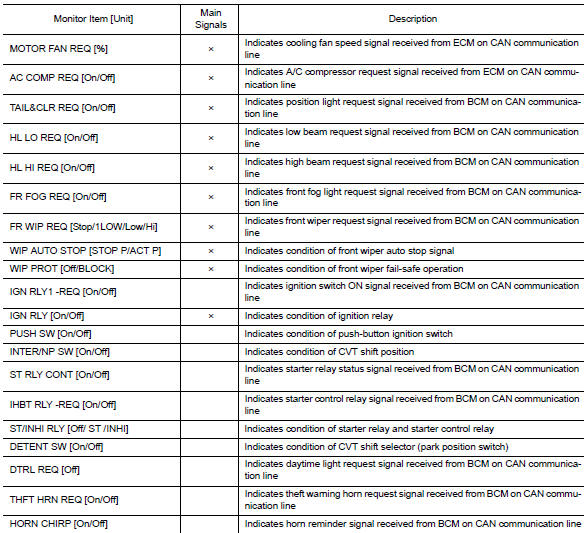
| Data Monitor | The IPDM E/R input/output data is displayed in real time. |
| Active Test | The IPDM E/R activates outputs to test components. |
| CAN Diag Support Mntr | The result of transmit/receive diagnosis of CAN communication is displayed. |
Ecu identification
The IPDM E/R part number is displayed.
SELF DIAGNOSTIC RESULT
Refer to PCS-48, "DTC Index".
DATA MONITOR
ACTIVE TEST


CAN DIAG SUPPORT MNTR
Refer to LAN-13, "CAN Diagnostic Support Monitor".
 System description
Component parts
Nissan vehicle immobilizer system-nats
Nissan vehicle immobilizer systemnats
: component parts location
Bcm
(view with instrument panel removed)
Dongle unit (canada onl ...
 Ecu diagnosis information
Ecm, ipdm e/r, bcm
List of ecu reference
...
Other materials:
Rear window and outside mirror (if so equipped)
defroster switch
To defrost the rear window glass and outside
mirror (if so equipped), start the engine and push
the rear window defroster switch on. The rear
window defroster indicator light on the switch
comes on. Push the switch again to turn the
defroster off.
The rear window defroster automatically ...
Basic inspection
Diagnosis and repair workflow
Work flow
OVERALL SEQUENCE
DETAILED FLOW
1.INTERVIEW FOR MALFUNCTION
Find out what the customer's concerns are.
>> GO TO 2.
2.SYMPTOM CHECK
Verify the symptom from the customer's information.
>> GO TO 3.
3.BASIC INSPECTION
Check the operat ...
Types of tires
WARNING
When changing or replacing tires, be
sure all four tires are of the same type
(i.e., Summer, All Season or Snow) and
construction. A NISSAN dealer may be
able to help you with information about
tire type, size, speed rating and
availability.
Replacement ...
