
Nissan Sentra Service Manual: Diagnosis and repair work flow
Work flow
OVERALL SEQUENCE
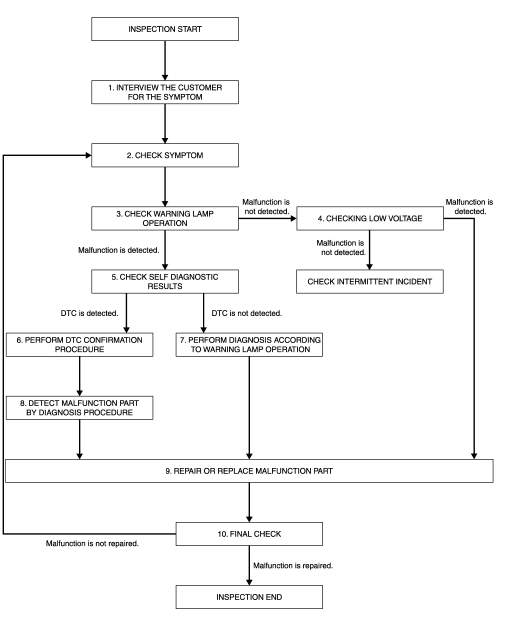
DETAILED FLOW
1.INTERVIEW THE CUSTOMER FOR THE SYMPTOM
Interview the customer for the symptom (the condition and the environment when the incident/malfunction occurs).
>> GO TO 2.
2.CHECK SYMPTOM
Check the symptom from the customer information.
>> GO TO 3.
3.CHECK WARNING LAMP OPERATION
Check air bag warning lamp operation in the user mode. Refer to SRC-15, "On Board Diagnosis Function".
Are any malfunction detected? YES >> GO TO 5.
NO >> GO TO 4.
4.CHECK LOW VOLTAGE
Check low voltage.
Are any malfunction detected? YES >> GO TO 9.
NO >> Check intermittent incident. Refer to GI-39, "Intermittent Incident".
5.CHECK SELF DIAGNOSTIC RESULTS
Check self diagnostic result with CONSULT or diagnosis mode.
If it is impossible to switch to diagnosis mode, follow the same procedure that DTC is not detected.
NOTE:
Perform the following procedure if DTC is detected.
- Record DTC (Print them out with CONSULT.)
- Erase self diagnostic result.
- Study the relationship between the malfunction that DTC or air bag warning lamp indicates and the symptom that the customer describes.
- Check related service bulletins for information.
Is DTC detected? YES >> GO TO 6.
NO >> GO TO 7.
6.PERFORM DTC CONFIRMATION PROCEDURE
Perform DTC CONFIRMATION PROCEDURE for the DTC.
>> GO TO 8.
7.PERFORM DIAGNOSIS ACCORDING TO WARNING LAMP OPERATION
- Check air bag warning lamp operation in the user mode. Refer to SRC-15, "On Board Diagnosis Function".
- Perform Diagnosis Procedure for the air bag warning lamp operation. Refer to SRC-15, "On Board Diagnosis Function" (USER MODE).
>> GO TO 9.
8.DETECT MALFUNCTIONING PART BY DIAGNOSTIC PROCEDURE
Inspect according to Diagnostic Procedure of the DTC.
>> GO TO 9.
9.REPAIR OR REPLACE THE MALFUNCTION PART
Repair or replace the malfunctioning part.
>> GO TO 10.
10.FINAL CHECK
Check self diagnostic result and air bag warning lamp operation in the user mode.
Is the malfunction repaired? YES >> INSPECTION END
NO >> GO TO 2.
 Basic inspection
...
 Inspection and adjustment
Additional service when replacing control unit
ADDITIONAL SERVICE WHEN REPLACING CONTROL UNIT : Description
WARNING:
Always perform zero point reset using CONSULT when removing and
installing th ...
Other materials:
Air conditioner operation (if so equipped)
Start the engine, turn the fan control dial to the
desired position, and press the
button to
activate the air conditioner. When the air conditioner
is on, cooling and dehumidifying functions
are added to the heater operation.
The air conditioner cooling function operates
only whe ...
P0967 Pressure control solenoid B
DTC Logic
DTC DETECTION LOGIC
DTC
CONSULT screen terms
(Trouble diagnosis content)
DTC detection condition
Possible causes
P0967
PC SOLENOID B
(Pressure Control Solenoid B
Control Circuit High)
The primary pressure solenoid valve current is
200 mA or les ...
Windshield glass
Exploded View
Windshield glass molding
Spacer
Rubber dam
Windshield glass
Windshield insulator
Front pillar finisher
Instrument panel
Cowl top cover
Roof panel
Cowl top
Body side outer
Headlining
Adhesive
12 +2.0 mm (0.5 +0.08 in)
7 +2.0 mm (0.3 +0.08 in)
...
