
Nissan Sentra Owners Manual: Automatic anti-glare rearview mirror (if so equipped)
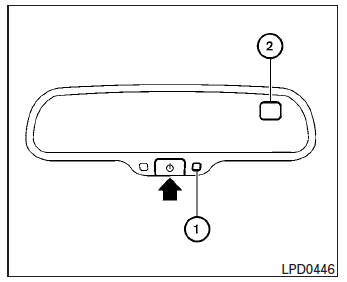
The inside mirror is designed so that it automatically dims according to the intensity of the headlights of the vehicle following you. The automatic anti-glare feature is activated when the ignition switch is in the ON position.
NOTE:
Do not hang any objects over the sensors 1 or apply glass cleaner to the sensors.
Doing so will reduce the sensitivity of the sensors, resulting in improper operation.
The indicator light will illuminate when the automatic anti-glare feature is operating.
With the ignition switch in the ON position, press
the  button as described:
- To turn off the anti-glare feature, press and
hold the
 button for 3-6
seconds. The indicator light will turn off. - To turn on the anti-glare feature, press and
hold the
 button for 3-6 seconds
again. The indicator light will turn on.
For more information about the compass 2 and compass features (if so equipped), refer to “Compass display� in the “Instruments and controls� section of this manual.
 Rearview mirror (if so equipped)
The night position 1 reduces glare from the
headlights of vehicles behind you at night.
Use the day position 2 when driving in daylight
hours.
WARNINGUse the night position only when ...
 Outside mirrors
The outside mirror remote control will operate
only when the ignition switch is in the ACC or ON
position.
Move the small switch 1 to select the right or left
mirror. Adjust each mirror to t ...
Other materials:
Manual operation
Fan speed control
Press the fan control buttons to
manually
control the fan speed.
Press the AUTO button to return to automatic
control of the fan speed.
Air recirculation
Press the air recirculation
button to recirculate
interior air inside the vehicle. The
indicator light on the b ...
Precaution for Supplemental Restraint System (SRS) "AIR BAG" and "SEAT BELT
PRE-TENSIONER"
The Supplemental Restraint System such as “AIR BAG” and “SEAT BELT PRE-TENSIONER”,
used along
with a front seat belt, helps to reduce the risk or severity of injury to the
driver and front passenger for certain
types of collision. Information necessary to service the system ...
System description
System
Can communication system
Can communication system : system description
CAN (Controller Area Network) is a serial communication line for real time
application. It is an on-vehicle multiplex
communication line with high data communication speed and excellent error
detection ability. Man ...
