
Nissan Sentra Service Manual: Wheel sensor
Front wheel sensor
FRONT WHEEL SENSOR : Exploded View
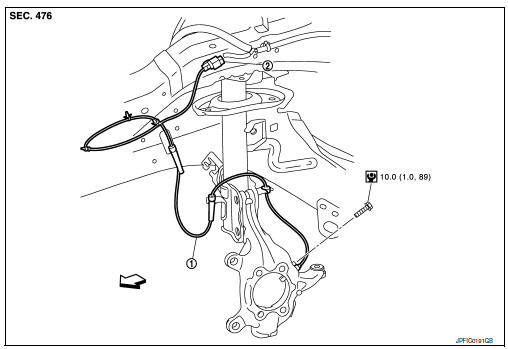
-
Front wheel sensor
-
Front wheel sensor harness connector
 Front
Front
FRONT WHEEL SENSOR : Removal and Installation
CAUTION:
-
Be careful not to damage wheel sensor edge and sensor rotor teeth.
-
When removing the front or rear wheel hub, first remove the wheel sensor from the wheel hub. Failure to do so may result in damage to the wheel sensor wires, making the sensor inoperative.
-
Pull out the wheel sensor, being careful to turn it as little as possible. Do not pull on the wheel sensor harness.
-
Before installation, check if foreign objects such as iron fragments are adhered to the pick-up part of the sensor or to the inside of the hole in the wheel hub for the wheel sensor, or if a foreign object is caught in the surface of the mating surface for the sensor rotor. Clean as necessary and then install the wheel sensor.
REMOVAL
-
Remove the front wheels and tires using power tool. Refer to WT-47, "Adjustment".
-
Remove the fender protector (front). Refer to EXT-28, "FENDER PROTECTOR : Removal and Installation - Front Fender Protector".
-
Disconnect front wheel sensor harness connector.
-
Disconnect front wheel sensor harness from brackets.
-
Remove front wheel sensor bolt.
-
Remove front wheel sensor.
INSTALLATION
Installation is in the reverse order of removal.
CAUTION:
-
During installation, make sure there is no foreign material such as iron chips on and in the mounting hole of the wheel sensor. Make sure no foreign material has been caught in the sensor rotor. Remove and foreign material and clean the mount.
-
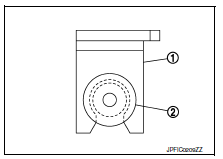
Do not twist front wheel sensor harness when installing front wheel sensor. Check that grommet (2) is fully inserted to bracket (1). Check that front wheel sensor harness is not twisted after installation.
Rear wheel sensor
REAR WHEEL SENSOR : Exploded View
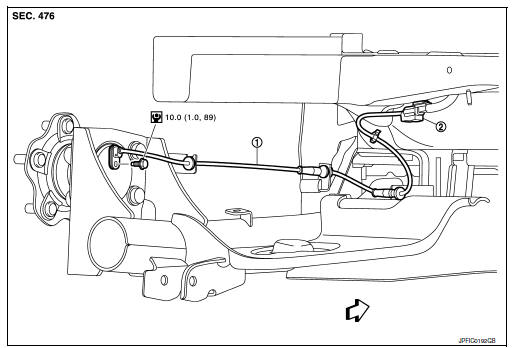
-
Rear wheel sensor
-
Rear wheel sensor harness connector
 Front
Front
REAR WHEEL SENSOR : Removal and Installation
CAUTION:
-
Be careful not to damage wheel sensor edge and sensor rotor teeth.
-
When removing the front or rear wheel hub, first remove the wheel sensor from the wheel hub. Failure to do so may result in damage to the wheel sensor wires, making the sensor inoperative.
-
Pull out the wheel sensor, being careful to turn it as little as possible. Do not pull on the wheel sensor harness.
-
Before installation, check if foreign objects such as iron fragments are adhered to the pick-up part of the sensor or to the inside of the hole in the wheel hub for the wheel sensor, or if a foreign object is caught in the surface of the mating surface for the sensor rotor. Clean as necessary and then install the wheel sensor.
REMOVAL
-
Remove rear wheel sensor harness connector.
-
Remove rear wheel sensor bolt.
-
Remove rear wheel sensor harness from the brackets.
INSTALLATION
Installation is in the reverse order of removal.
CAUTION:
-
During installation, make sure there is no foreign material such as iron chips on and in the mounting hole of the wheel sensor. Make sure no foreign material has been caught in the sensor rotor. Remove and foreign material and clean the mount.
-
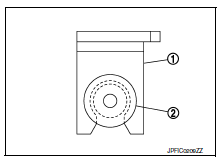
Do not twist front wheel sensor harness when installing front wheel sensor. Check that grommet (2) is fully inserted to bracket (1). Check that front wheel sensor harness is not twisted after installation.

 Sensor rotor
Front sensor rotor
FRONT SENSOR ROTOR : Removal and Installation
The front wheel sensor rotor is an integral part of the wheel
hub and bearing assembly and cannot be disassembled.
Refer to FAX- ...
Other materials:
Brake pedal position switch
Component Function Check
1.CHECK BRAKE PEDAL POSITION SWITCH FUNCTION
With CONSULT
Turn ignition switch ON.
Select “ENGINE” using CONSULT.
Select “BRAKE SW1” in “DATA MONITOR” mode.
Check “BRAKE SW1” indication under the following conditions.
...
P060B ECM
DTC Logic
DTC DETECTION LOGIC
DTC No.
CONSULT screen terms
(Trouble diagnosis content)
DTC detecting condition
Possible cause
P060B
CONTROL MODULE
(Internal control module A/
D processing performance)
ECM internal analog/digital conversion processing
syst ...
Description
Number
Item
Description
1
Power supply
This means the power supply of fusible link or fuse.
2
Fusible link
“X” means the fusible link.
3
Number of fusible link/
fuse
This means the numbe ...
