
Nissan Sentra Service Manual: Symptom diagnosis
Multi av system
Symptom table
Related to audio
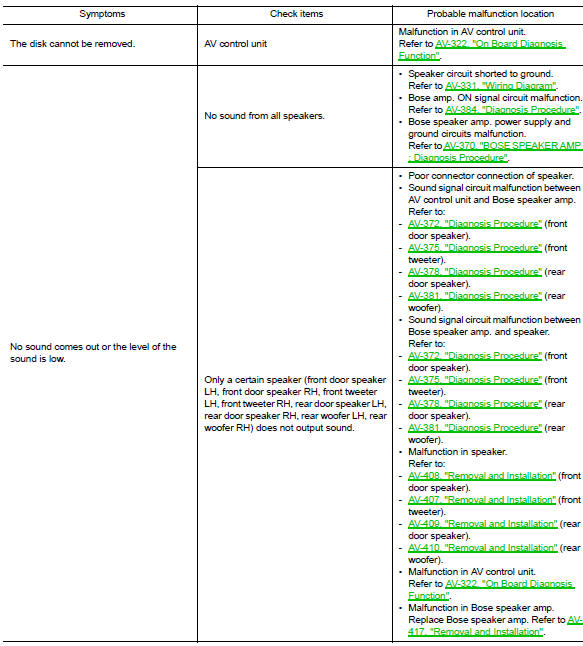
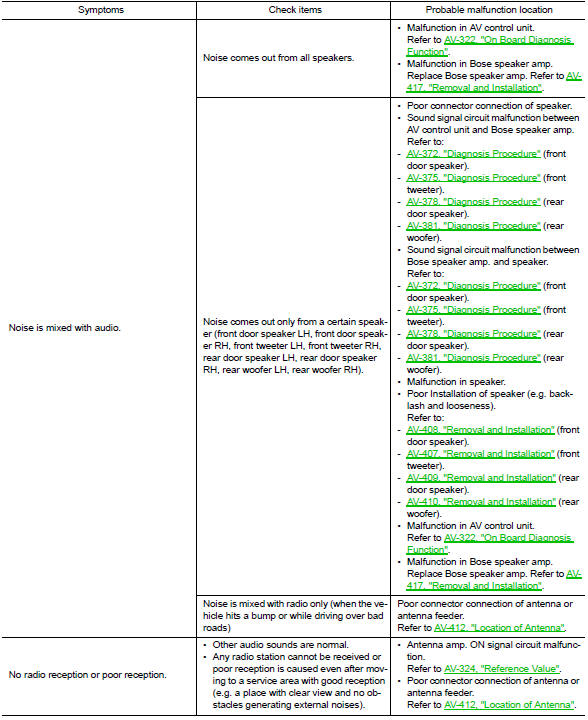
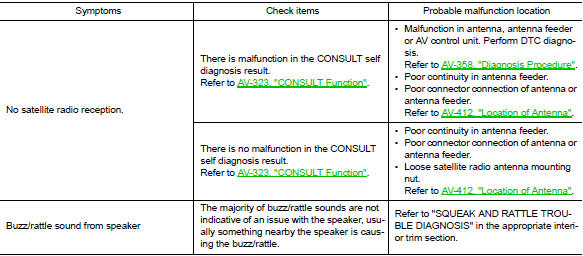
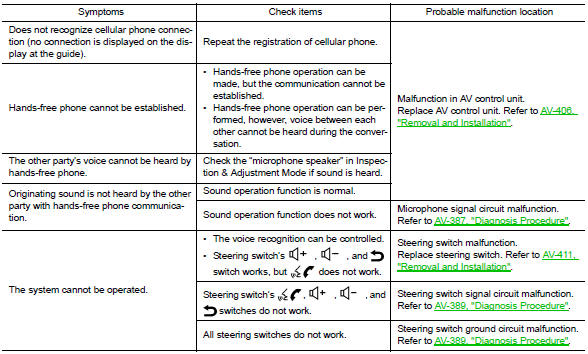
Related to hands-free phone
- Before performing diagnosis, confirm that the cellular phone being used by the customer is compatible with the vehicle.
- It is possible that a malfunction is occurring due to a version change of the phone even though the phone is a compatible type. This can be confirmed by changing the cellular phone to another compatible type, and check that it operates normally. It is important to determine whether the cause of the malfunction is the vehicle or the cellular phone.
Check compatibility
- Make sure the customer’s bluetooth® related concern is understood.
- Verify the customer’s concern.
Note:
The customer’s phone may be required, depending upon their concern.
- Write down the customer’s phone brand, model and service provider.
Note:
It is necessary to know the service provider. On occasion, a given phone may be on the approved list with one provider, but may not be on the approved list with other providers.
- Go to “www.Nissanusa.Com/bluetooth/”.
- Using the website’s search engine, find out if the customer’s phone is on the approved list.
- If the customer’s phone is NOT on the approved list: Stop diagnosis here. The customer needs to obtain a Bluetooth® phone that is on the approved list before any further action.
- If the feature related to the customer’s concern shows as “N” (not compatible): Stop diagnosis here. If the customer still wants the feature to function, they will need to get an approved phone showing the feature as “Y” (compatible) in the “Basic Features”.
- If the feature related to the customer’s concern shows as “y” (compatible): perform diagnosis as per the following table.
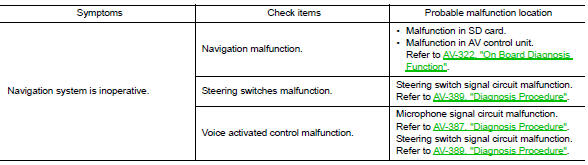
Related to navigation
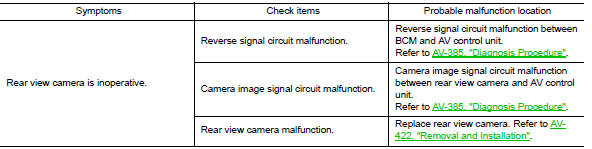
Related to rear view camera
Normal operating condition
Description
Related to noise
The majority of the audio concerns are the result of outside causes (bad cd, electromagnetic interference, etc.).
The following noise results from variations in field strength, such as fading noise and multi-path noise, or external noise from trains and other sources. It is not a malfunction.
- Fading noise: this noise occurs because of variations in the field strength in a narrow range due to mountains or buildings blocking the signal.
- Multi-path noise: This noise results from the waves sent directly from the broadcast station arriving at the antenna at a different time from the waves which reflect off mountains or buildings.
The vehicle itself can be a source of noise if noise prevention parts or electrical equipment is malfunctioning.
Check if noise is caused and/or changed by engine speed, ignition switch turned to each position, and operation of each piece of electrical equipment, and determine the cause.
Note:
The source of the noise can be found easily by listening to the noise while removing the fuses of electrical components, one by one.
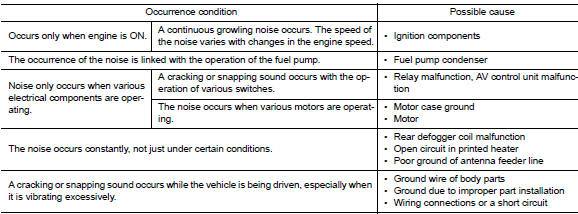
Type of noise and possible cause
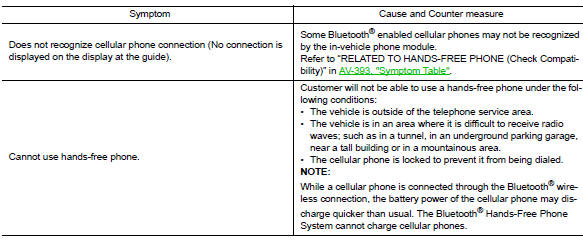
Related to hands-free phone

Related to navigation
Basic operation
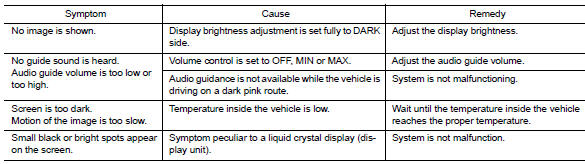
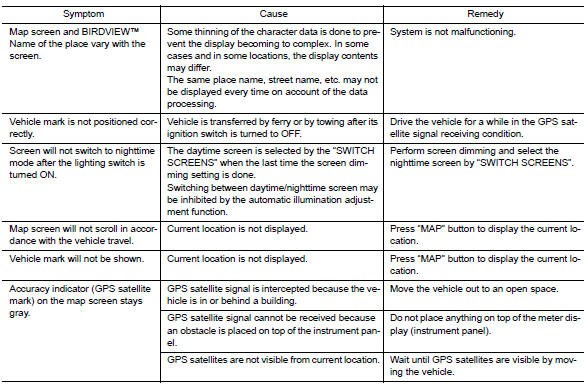
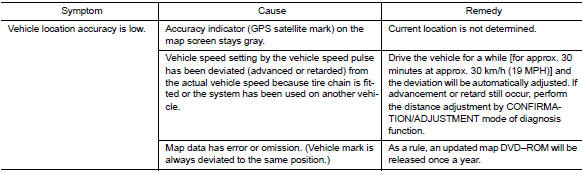
Vehicle mark
Destination, passing points and menu items cannot be selected/set
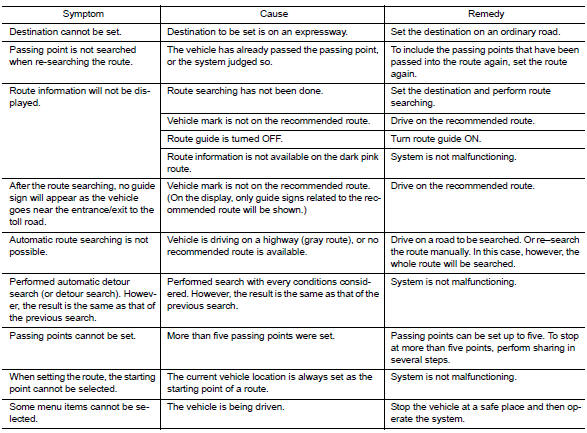
Voice guide
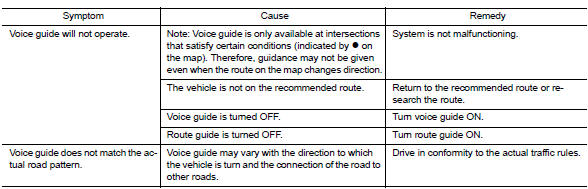
Route search
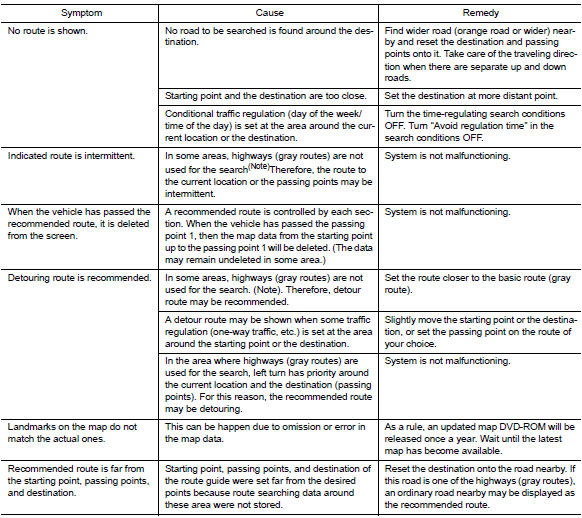
Note:
Except for the ordinance-designated cities. (Malfunctioning areas may be changed in the updated map disc.)
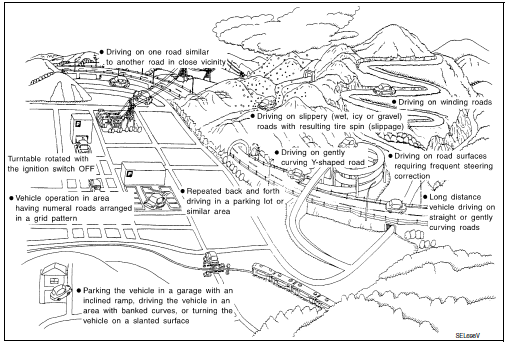
Examples of current-location mark displacement
Vehicle's travel amount is calculated by reading its travel distance and turning angle. Therefore, if the vehicle is driven in the following manner, an error will occur in the vehicle's current location display. If correct location has not been restored after driving the vehicle for a while, perform location correction.
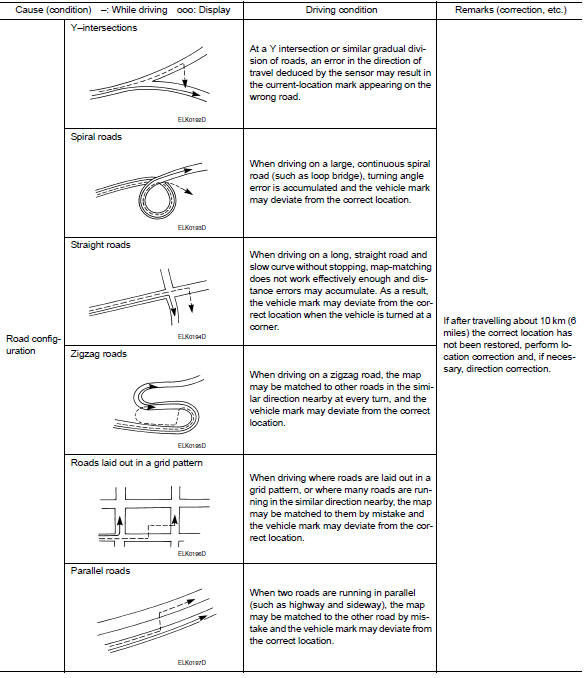
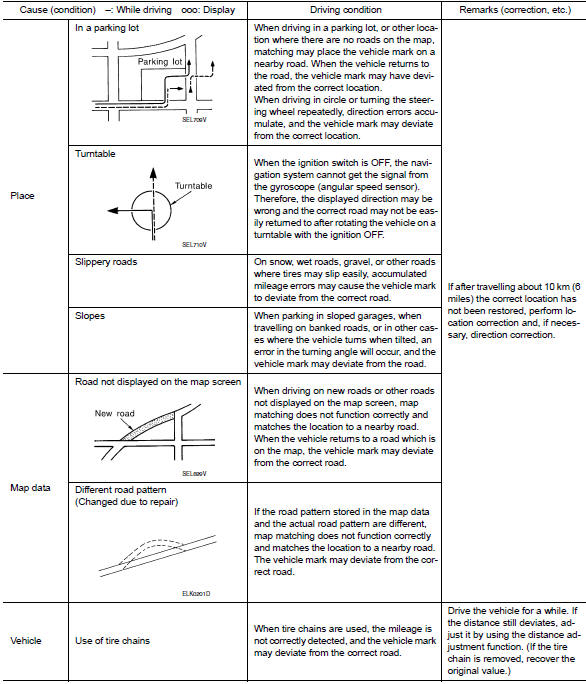
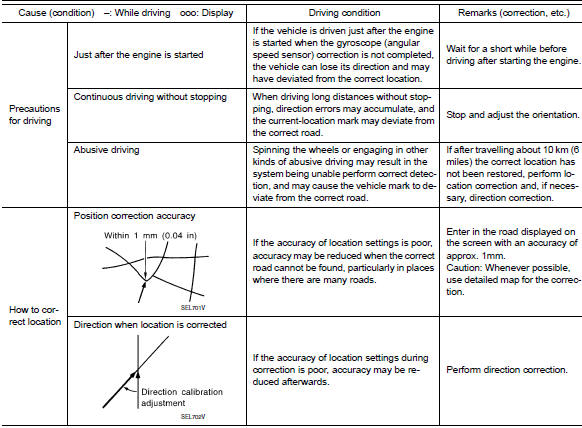
Location correction by map-matching is slow
- The map-matching function needs to refer to the data of the surrounding area. It is necessary to drive some distance for the function to work.
- Because map-matching operates on this principle, when there are many roads running in similar directions in the surrounding area, no matching determination may be made. The location may not be corrected until some special feature is found.
Name of road is not displayed
The current road name may not be displayed if there are no road names displayed on the map screen.
Contents of display differ for birdviewв„ў and the (flat) map screen
Difference of the BIRDVIEWв„ў screen from the flat map screen are as follows.
- The current place name displays names which are primarily in the direction of vehicle travel.
- The amount of time before the vehicle travel or turn angle is updated on the screen is longer than for the (flat) map display.
- The conditions for display of place names, roads, and other data are different for nearby areas and for more distant areas.
- Some thinning of the character data is done to prevent the display becoming too complex. In some cases and in some locations, the display contents may differ.
- The same place name, street name, etc. May be displayed multiple times
Vehicle mark shows a position which is completely wrong
In the following cases, the vehicle mark may appear on completely different position in the map depending on the gps satellite signal receiving conditions. In this case, perform location correction and direction correction.
When location correction has not been done
- If the receiving conditions of the gps satellite signal is poor, if the vehicle mark becomes out of place, it may move to a completely different location and not come back if location correction is not done. The position will be corrected if the gps signal can be received.
When the vehicle has traveled by ferry, or when the vehicle has been being towed
- Because calculation of the current location cannot be done when traveling with the ignition off, for example when traveling by ferry or when being towed, the location before travel is displayed. If the precise location can be detected with GPS, the location will be corrected.
Vehicle mark jumps
In the following cases, the vehicle mark may appear to jump as a result of automatic correction of the current location
When map matching has been done
- If the current location and the vehicle mark are different when map matching is done, the vehicle mark may seem to jump. At this time, the location may be “corrected” to the wrong road or to a location which is not on a road.
When gps location correction has been done
- If the current location and the vehicle mark are different when the location is corrected using gps measurements, the vehicle mark may seem to jump. At this time, the location may be “corrected” to a location which is not on a road.
Vehicle mark is in a river or sea
The navigation system moves the vehicle mark with no distinction between land and rivers or sea. If the vehicle mark is somehow out of place, it may appear that the vehicle is driving in a river or the sea.
Vehicle mark automatically rotates
The system wrongly memorizes the rotating status as stopping when the ignition switch is turned ON with the turntable rotating. That causes the vehicle mark to rotate when the vehicle is stopped.
When driving on same road, sometimes vehicle mark is in right place and sometimes it is in wrong place
The conditions of the gps antenna (gps data) and gyroscope (angular speed sensor) change gradually.
Depending on the road traveled and the operation of the steering wheel, the location detection results will be different. Therefore, even on a road on which the location has never been wrong, conditions may cause the vehicle mark to deviate.
 Power supply and ground circuit
Av control unit
Av control unit : diagnosis procedure
Regarding wiring diagram information, refer to av-331, "wiring diagram".
1.Check fuse
Check that the following fuses are not blown.
...
 Removal and installation
Av control unit
Exploded view
AV control unit
Av control unit bracket (lh)
AV control unit bracket (RH)
Removal and installation
Removal
Caution:
Remove battery terminal and av c ...
Other materials:
CSC(concentric slave cylinder)
Exploded View
Transaxle assembly
CSC (Concentric Slave Cylinder)
Removal and Installation
CAUTION:
Do not reuse CSC (Concentric Slave Cylinder). The CSC slides back
to the original position every
time the transaxle assembly is removed. This action may allow dust or
contamin ...
Transverse link
Exploded View
Upper link
Front suspension member
Transverse link
Front
Removal and Installation
REMOVAL
Remove the wheel and tire using power tool. Refer to WT-47, "Exploded
View".
Remove the nut and bolt from the lower ball joint. Disconnect the
transverse l ...
System description
Component parts
Component parts location
BCM (view with instrument panel removed)
ECM
IPDM E/R
Combination meter
Security indicator lamp
CVT shift selector (park position
switch) (view with center console removed)
Stop lamp switch
Push button ignition switch
NATS anten ...
