
Nissan Sentra Owners Manual: Front manual seat adjustment
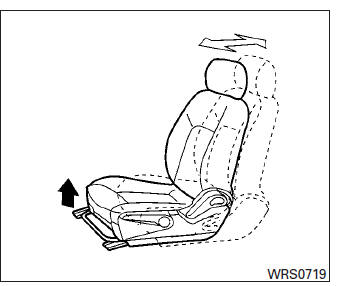
Forward and backward
Pull the center of the bar up and hold it while you slide the seat forward or backward to the desired position. Release the bar to lock the seat in position.
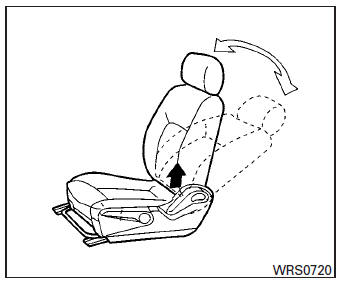
Reclining
To recline the seatback, pull the lever up and lean back. To bring the seatback forward, pull the lever up and lean your body forward. Release the lever to lock the seatback in position.
The reclining feature allows adjustment of the seatback for occupants of different sizes for added comfort and to help obtain proper seat belt fit. See “Precautions on seat belt usage� in this section. Also, the seatback can be reclined to allow occupants to rest when the vehicle is stopped and the shift lever (CVT) is in P (Park) or the manual shift lever is in N (Neutral) with the parking brake applied.

Seat lifter (driver’s seat)
Pull up or push down the adjusting lever to adjust the seat height until the desired position is achieved.
 Seats
Seats
WARNING
Do not ride in a moving vehicle when
the seatback is reclined. This can be
dangerous. The shoulder belt will not
be against your body. In an accident,
you could ...
 Folding rear seat
Pull the knob A to fold each seatback down.
WARNING
Never allow anyone to ride in the cargo
area or on the rear seat when it is in the
fold-down position. Use of these areas
...
Other materials:
Service data and specifications
(sds)
General Specification
Drive Belt
Spark Plug
*:Always check with the Parts Department for the latest parts information.
Exhaust Manifold
Camshaft
VALVE LIFTER
VALVE CLEARANCE
*: Approximately 80В°C (176В°F)
AVAILABLE VALVE LIFTER
*:Always check with the P ...
Key interlock cable
Exploded View
Shift selector assembly
Clip
Key interlock cable
Clip
Key cylinder
Removal and Installation
REMOVAL
CAUTION:
Always apply the parking brake before performing removal and
installation.
Remove the steering column cover, and the instrument lower panel LH.
R ...
System description
Component parts
POWER DOOR LOCK SYSTEM
POWER DOOR LOCK SYSTEM : Component Parts Location
BCM (view with instrument panel removed)
Front door switch LH
Front door lock actuator LH
Front door lock assembly LH
Front door switch RH
Front door lock actuator RH
Rear door switch RH
...
