
Nissan Sentra Owners Manual: Control buttons
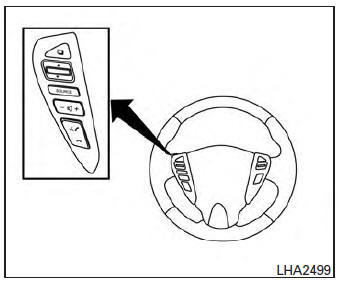
The control buttons for the Bluetooth® Hands-Free Phone System are located on the steering wheel.
 PHONE/SEND
Press the  button to
initiate a
VR session or answer an incoming
call.
You can also use the  button to
interrupt the system feedback and
give a command at once. See “List of
voice commands� and “During a call�
in this section for more information.
 PHONE/END
While the Voice Recognition system
is active, press and hold the
button for 5 seconds to quit the
Voice Recognition system at any
time.
 Tuning switch
While using the Voice Recognition system, tilt the tuning switch up or down to manually control the phone system.
 Using the system
The NISSAN Voice Recognition system allows
hands-free operation of the Bluetooth® Phone
System.
If the vehicle is in motion, some commands may
not be available so full attention may be given to ...
 Getting started
The following procedures will help you get
started using the Bluetooth® Hands-Free Phone
System with NISSAN Voice Recognition. For additional
command options, refer to “List of voice
commands†...
Other materials:
Interior trunk lid release
WARNINGClosely supervise children when they are
around cars to prevent them from playing
and becoming locked in the trunk where
they could be seriously injured. Keep the
car locked, with the rear seatback and
trunk lid securely latched when not in use,
and prevent childr ...
Keyfob (if so equipped)
Replace the battery in the keyfob as follows:
Remove the screw A .
Insert a small screwdriver into the slit of the
corner B and twist it to separate the upper
part from the lower part. Use a cloth to
protect the casing.
Replace the battery with a new one.
Do not touch the int ...
Jump starting
To start your engine with a booster battery, the
instructions and precautions below must be followed.
WARNING
If done incorrectly, jump starting can
lead to a battery explosion, resulting in
severe injury or death. It could also
damage your vehicle.
Explosive hydrogen ga ...
